Alcon ALEX 2.0
Seven years designing a global enterprise platform for Alcon, managing healthcare consultant engagements for one of the world's largest eye care companies
IA for a Global Enterprise Management Platform
Alcon
2019 - Ongoing
A Note on This Case Study
ALEX 2.0 is a seven-year and ongoing project. Unlike a typical case study built around specific problem solving, this one is more of a broad view of a long-running and complex product with specific focus on the user flow and process diagrams and wireframing that goes with a product of this complexity.
The intention is to give a sense of scale and the process required to build and evolve a system of this complexity over time. The work shown covers requirements gathering, wireframing, specification writing, and process and user flows.
The Client
Alcon is a global leader in eye care, operating across more than 70 countries with products covering surgical equipment and vision care.
A core part of their business involves engaging healthcare professionals (HCPs) including ophthalmologists, surgeons, optometrists, as speakers and medical experts. These engagements are subject to strict compliance regulations around how HCPs are selected, contracted, compensated, and reported on.
What is ALEX?
ALEX is Alcon's global healthcare professional engagement technology platform. It is an end‐to‐end management solution that covers event and consultant management, compliance, contracting, and payments.
Put simply, Alcon sales reps manage speaking events (engagements) in ALEX that revolve around a new Alcon eye care or vision care products in the market. These events are then attended by other medical practitioners.
The Old ALEX 1.0
The new project started with a defined brief:
The existing ALEX 1.0 system meets overall business and compliance needs within select markets (US, Canada, UK, Spain, Germany). However, the system is not customizable enough to meet ongoing needs across markets and has significant limitations, requiring more processes to be completed outside of the system than originally envisioned.
It was time for ALEX 2.0, a complete redesign of the system.
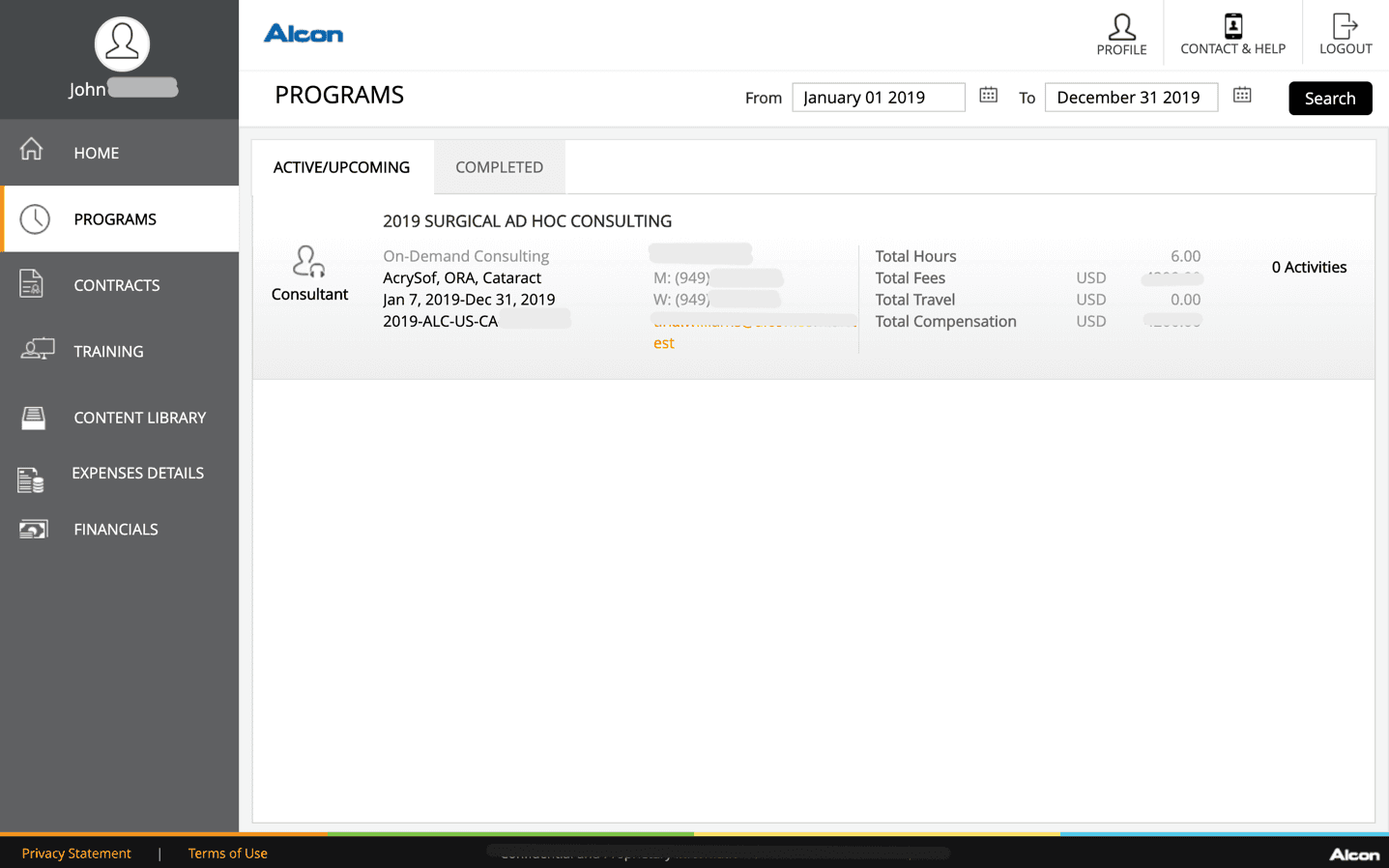
A screenshot of the old ALEX 1.0 system showing a consultant's upcoming programs (engagements)
The New ALEX 2.0
ALEX 2.0 (the Alcon Exchange Portal) manages the entire consultant engagement process end to end. From an initial event request through to consultant payment and financial closeout, every step flows through the system, replacing the legacy platform that had reached the end of its life and could no longer scale to Alcon's global requirements.
My Role
I was the sole UX Designer on the team. My job was to listen to what Alcon needed the system to do and translate that into wireframes, diagrams, and specification documents. I also collaborated with the development closely in both build and testing phases during each sprint.
Design: Requirements gathering, user and process flows, specifications, wireframing, UI design.
Testing: Internal testing against specification and UI before each UAT cycle.
Primary Tools: Mockflow, Figma, Google Docs and Sheets, JIRA, Confluence
Project Timeline
The project started in mid-2019 with a discovery phase and for the next several months there were daily remote workshop calls with the Alcon project stakeholders in the US, working through overall requirements screen by screen and flow by flow.
The objective was to go live with the core system - three portals, by end of the year.
Engagement Portal - used by Alcon staff to create, manage, and approve engagements
Admin Portal - used by admins to configure the system per country, engagement type, and user role
Consultant Portal - used by external HCPs to view engagements, sign contracts, and submit expenses
When a wireframe was signed off it went into development. Visual design was delivered ad-hoc where required as the project demanded. There was no dedicated UI design phase or design system. Predefined components and and forms were repurposed and tailored during development and testing.
Overall, the design phase was only ever one step ahead of development for the first few years of the project.
Requirements Gathering
In this early phase, the full business process was mapped out across multiple user roles, engagement statuses, decision points, approval routing, planner actions, speaker confirmation steps, and closeout tasks.
Key questions from the start included what exactly is an engagement? How are they requested? What is the approval criteria and workflow? What kind of users are involved along the way?
Working through the business process in this level of detail first was essential given the number of user roles involved and the volume of decisions that had to be made before a requestor could even submit an engagement.
The examples used in this requirements gathering section is of an engagement type called "Speaker Bureau", which is one of the several different engagement types designed in ALEX.
Engagement Process Flow
Below you can see swim lanes by user role with each lane showing the actions and decisions that role is responsible for at each stage, and status transitions for both the engagement and the speaker tracked separately throughout, since the two could move independently of each other depending on what was happening in the workflow at any given point.
What makes these diagrams useful as a case study artifact is not just what it shows but what it captures around the edges.
Yellow sticky notes detail general information and descriptions, green notes signal a change to the wireframes being designed in parallel, and red notes flag open questions and decisions still being worked through with Alcon at the time, things like:
how planner routing should be determined (the user responsible for planning location, travel and logistics),
whether budget release should be manual or automatic (every speaker and event was calculated against the requesting country budget),
how to handle speaker travel booking when a speaker confirms late (post-approval planning tasks),
what the sign-in experience at the event should look like (RSVP, Sign-In, Reminders etc.).
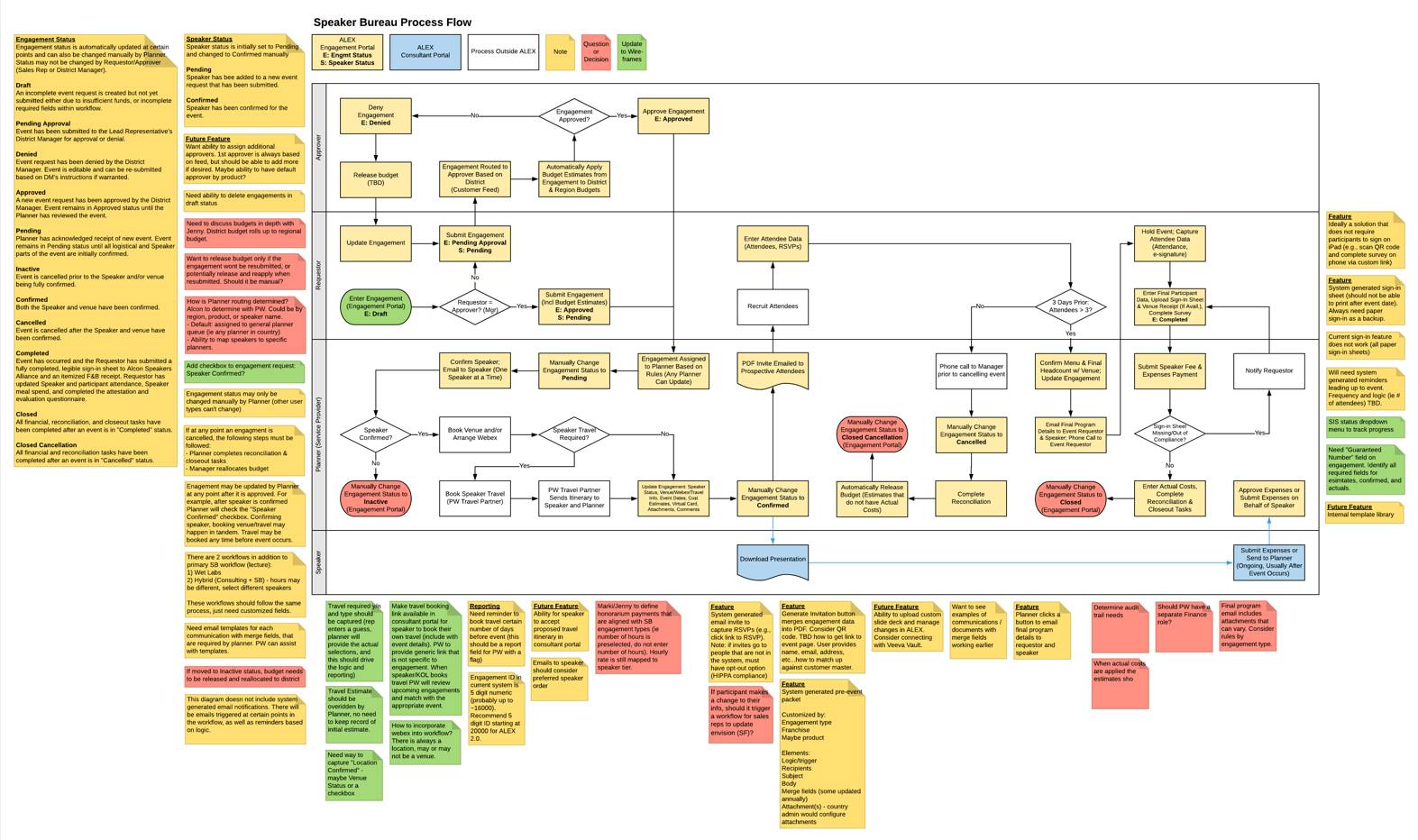
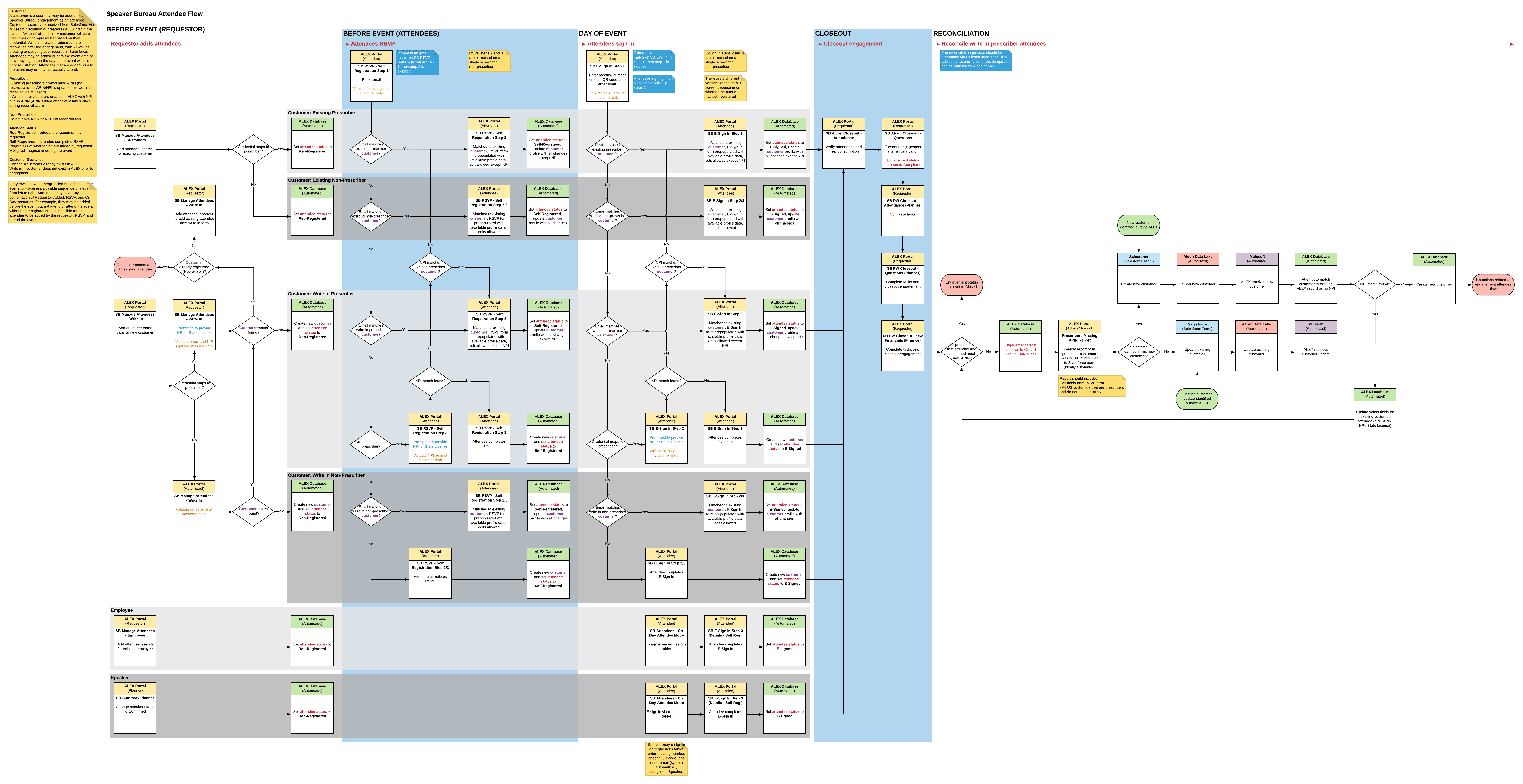
Process flow diagrams of the Speaker Bureau engagement type (engagement process followed by the attendee process)
Attendees Flows
The attendee management flow above was one of the more complex parts of the system to design because it spanned multiple stages, multiple user types, and the real world event itself happening outside the system.
Speaker engagements were attended by other medical professionals and sales reps and the system needed to capture attendee details for compliance with government reporting. Alcon had a growing database of attendees details which also allowed the system to send out invitations and reminders of upcoming events.
This diagram above maps the full attendee journey from initial RSVP invitation through to post-event sign-in confirmation and closeout. It covers the different paths an attendee could take depending on whether they had been pre-registered, were walk-ins on the day, or were Alcon employees rather than external customers. It also defines the sign-in flow, which required attendees to confirm their details, answer compliance questions, and provide an electronic signature before their attendance could be recorded.
Screen Flows
The process flow diagrams defined what needed to happen across the full engagement lifecycle. The screen flow diagrams translated that into what the system actually needed to show and when.
This diagram maps the same Speaker Bureau engagement journey but now in terms of screens, navigation paths, and user actions within the system.
Each of the eight stages is numbered and colour-coded by the user role responsible. You can see how a submitted engagement moves from one user's queue to another, what screens they land on, what decisions they make, and what status changes occur as a result. The cancellation path running along the bottom shows that an engagement can exit the workflow at almost any point, which needed to be handled across every stage.
This is the bridge between the business process and the wireframes. This diagram confirmed what that screen needed to do, who would be looking at it, and what came before and after it.
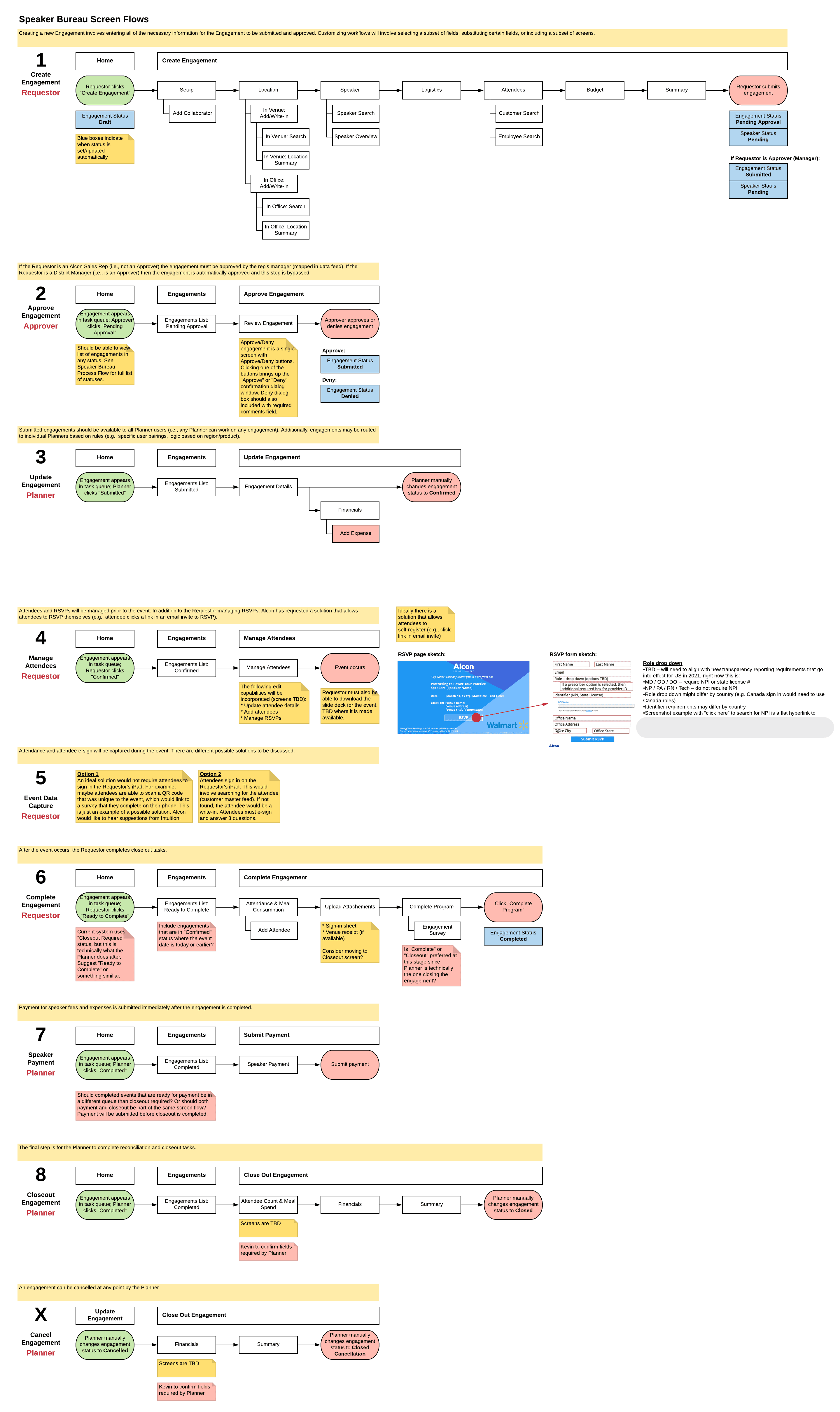
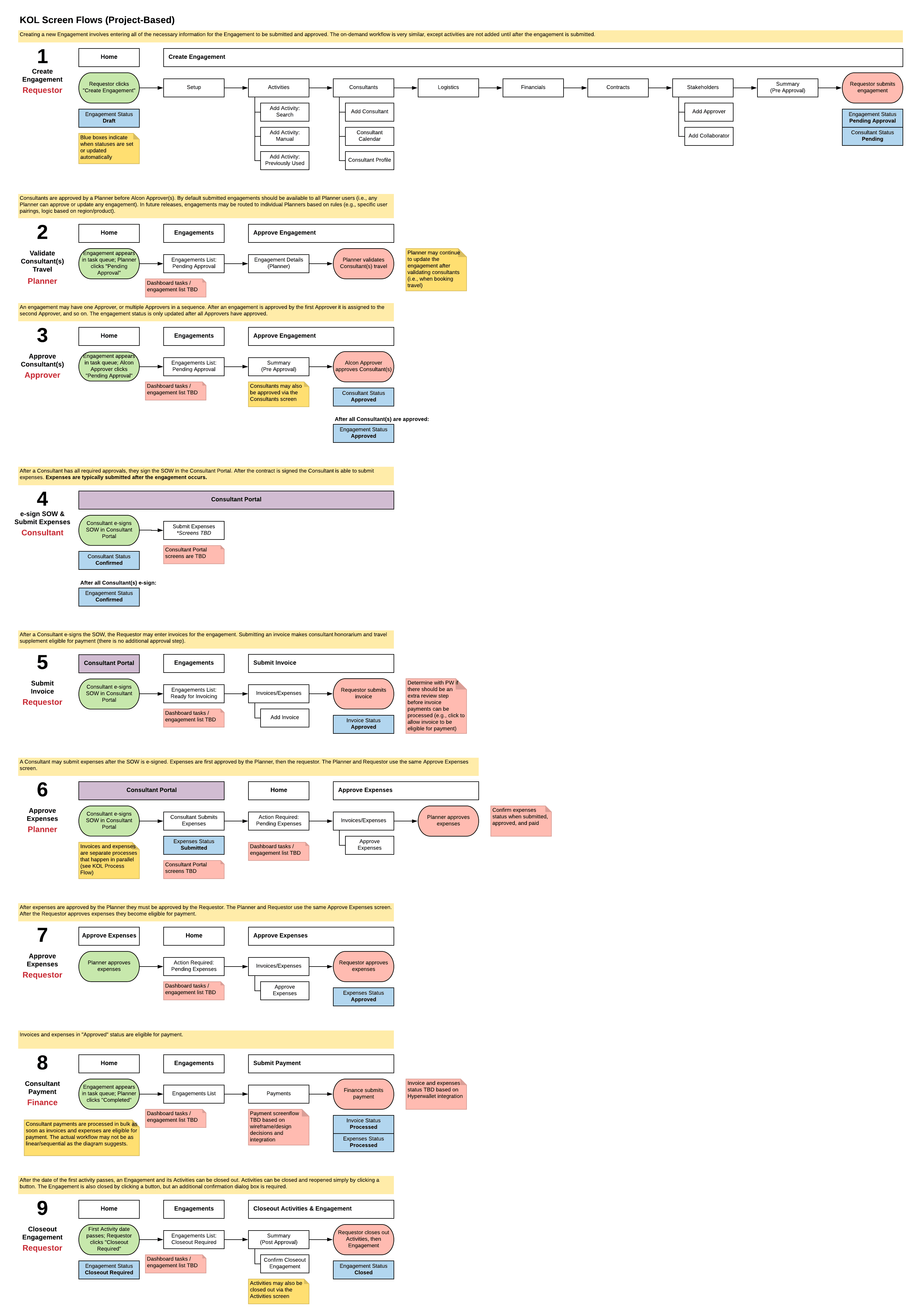
A screen flow diagram example of the Speaker Bureau engagement type showing screens, navigation paths, and user actions. There is also an exmaple of the KOL equivilent.
Wireframing
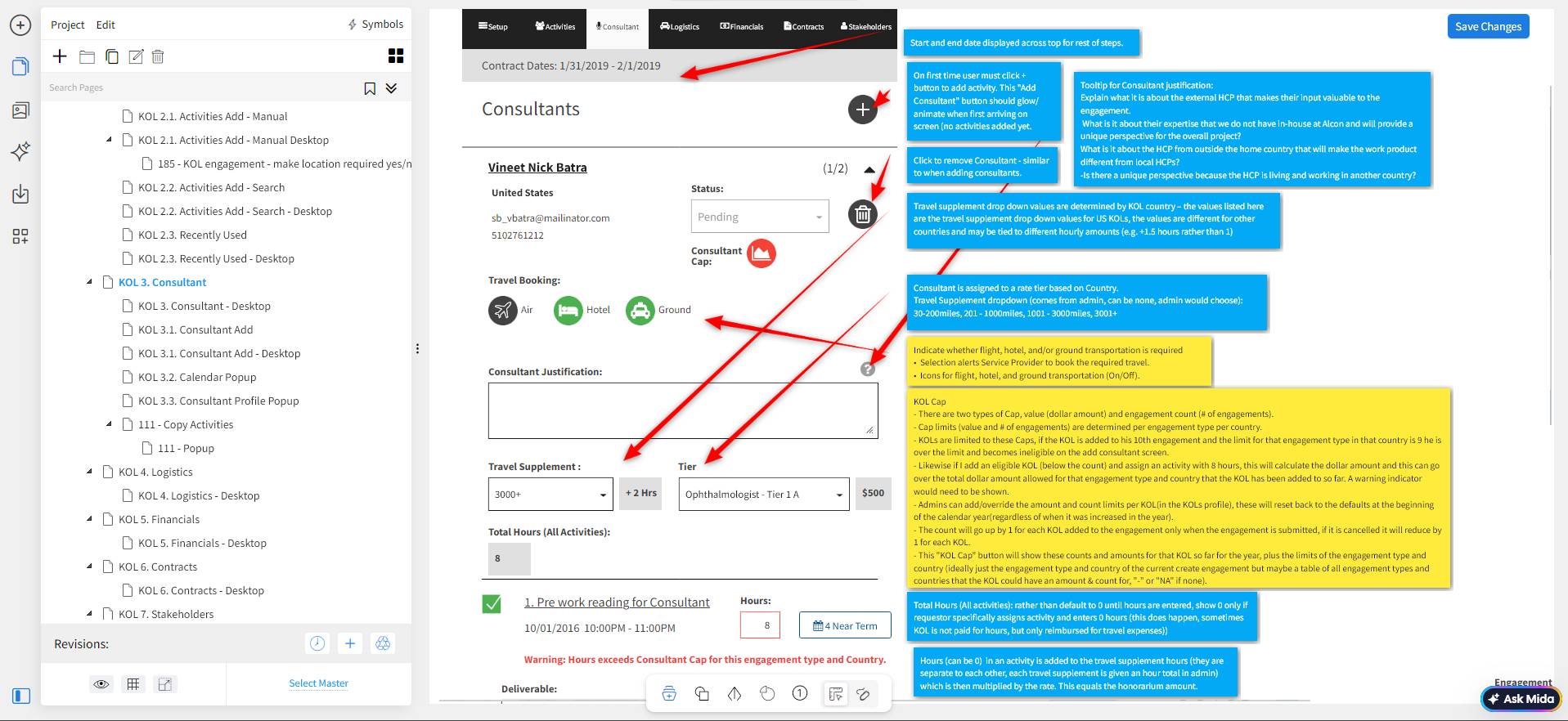
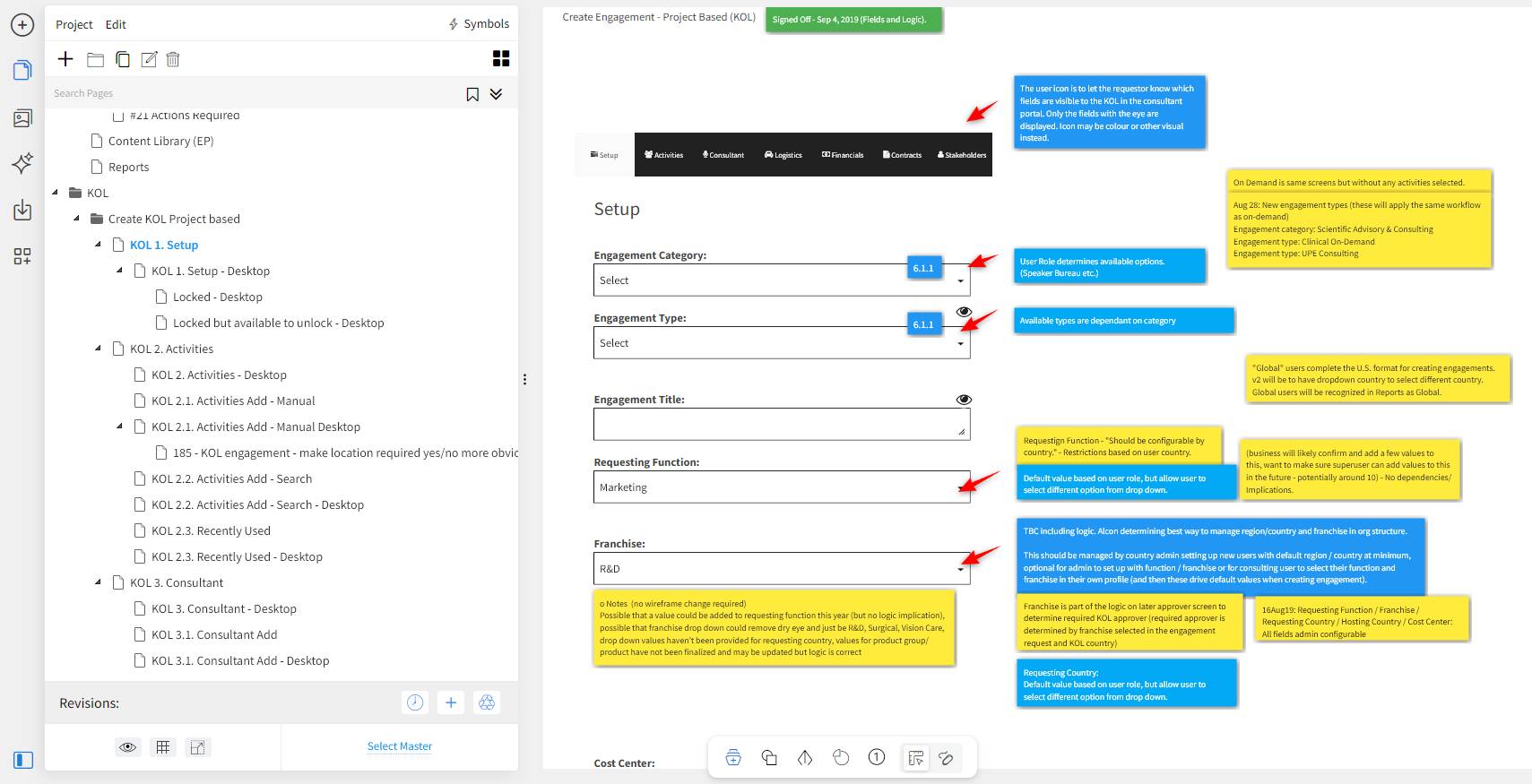
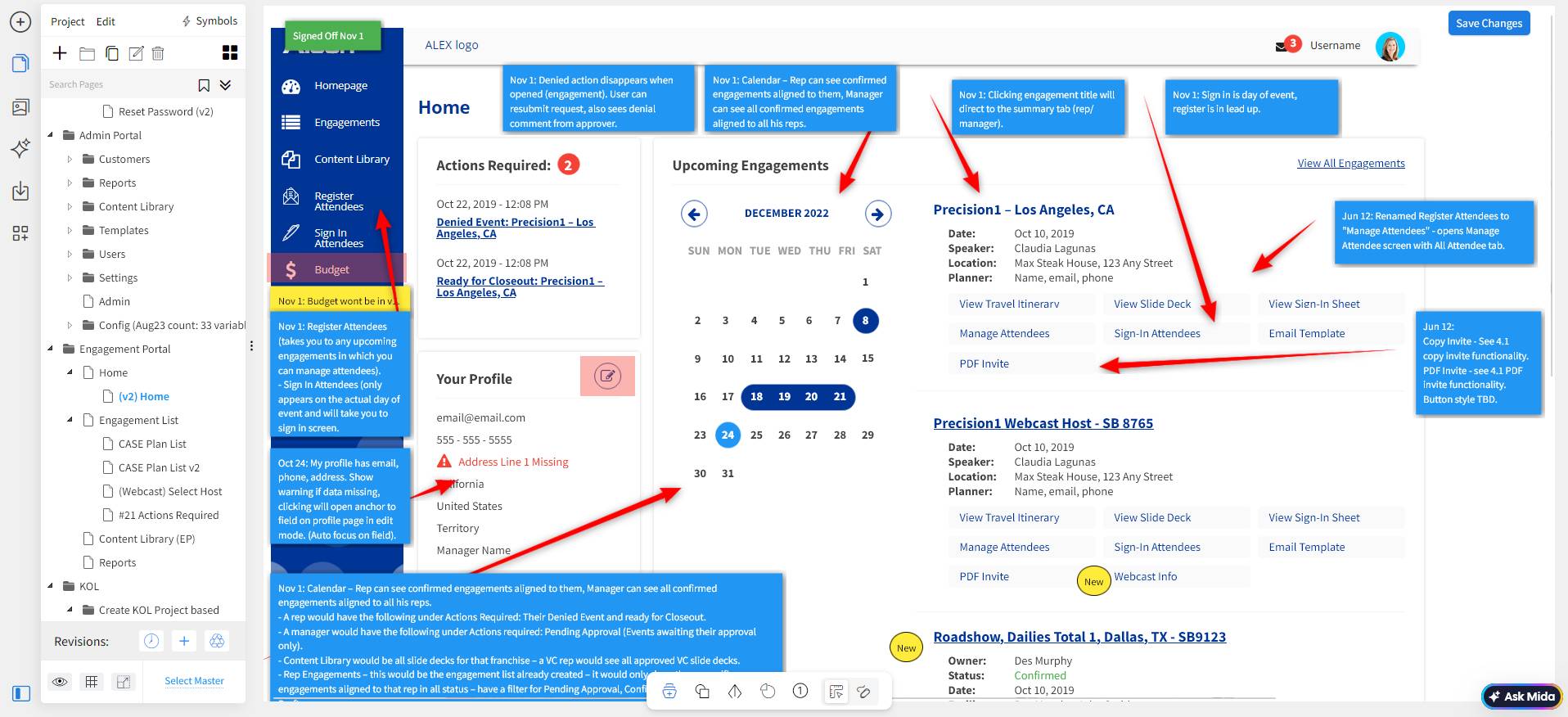
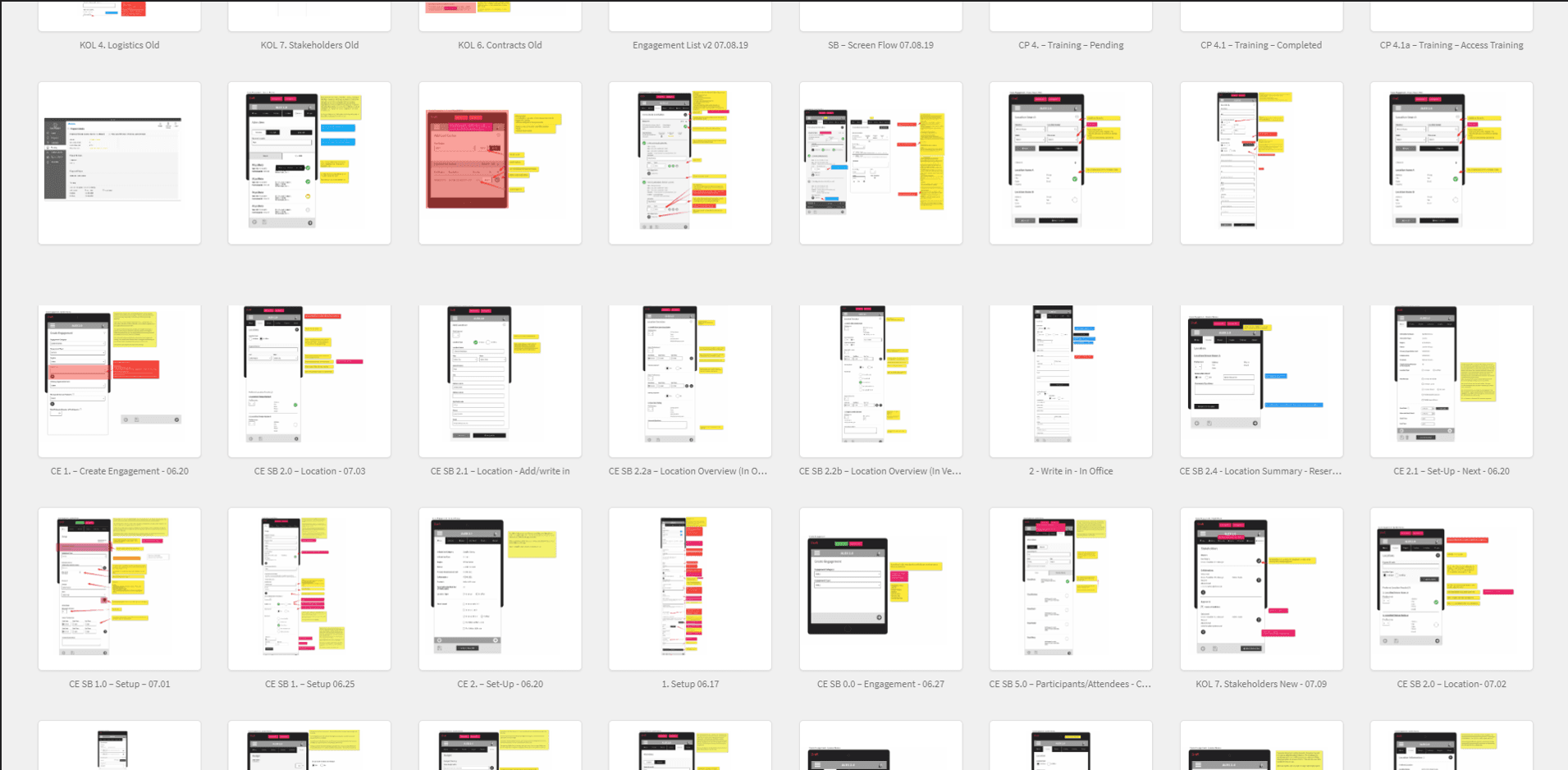
In parallel with defining the screen flow diagrams I was wireframing in Mockflow with detailed annotations capturing context, business logic, technical considerations, and open questions. They show the level of complexity surrounding each field and screen which could have validations, predefined values, connections or dependencies, and other logic related to the submission and approval process.
These wireframes were reviewed and iterations made daily through the online workshops for the first couple of years of the project.
These early wireframes were focused more on documenting the core functionalities and logic of the engagement itself than specific layout design. However, notice that most of these early wireframe layouts fit a tablet device as most sales reps who request and manage these engagements do so on tablet devices as they participate in the event itself.
The Key Take Away
The Alcon ALEX 2.0 project went live with three portals within 6 months. The system is still in continuous agile design and build seven years later. New screens, business objectives, real world scenarios, new edge cases, and various features and requirements are requested, designed, and developed for each portal over time.
At the time of writing this case study currently, it's purpose remains as a glimpse into the research and specification process of a product at this scale.